Why Is My Phone Getting Hot
Why Is My Phone Getting Hot
Many people notice that their phones can get hot during use. This can be concerning, especially if you are unsure why it happens. Understanding the reasons behind a hot phone can help you manage the situation better.
Common Reasons for Phone Overheating
There are several reasons why your phone might be heating up. Here are some of the most common causes:
- Heavy Usage: Using your phone for long periods can cause it to heat up. Activities like gaming, streaming videos, or using demanding applications require a lot of power.
- Background Apps: Some apps continue to run in the background, consuming resources. This can lead to increased heat generation.
- High Ambient Temperature: If you are in a hot environment, your phone may struggle to cool down. External heat can affect its temperature.
- Charging: Phones can get warm while charging. This is especially true if you are using a fast charger or if the cable is damaged.
- Software Issues: Bugs or outdated software can cause your phone to work harder than necessary, leading to overheating.
- Hardware Problems: Sometimes, there may be a hardware issue, such as a failing battery, that causes heat buildup.
Signs of Overheating
It is important to recognize the signs that your phone is overheating. Here are a few indicators:
- Your phone feels hot to the touch.
- The screen may dim or turn off.
- Apps may crash or freeze.
- The battery drains quickly.
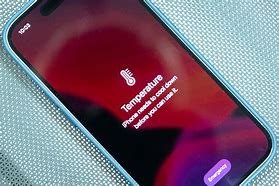
- You might receive a warning message about the temperature.
How to Cool Down Your Phone
If you notice that your phone is getting hot, there are several steps you can take to cool it down:
- Stop Using Demanding Apps: Close any apps that are resource-heavy. This can help reduce the heat quickly.
- Remove the Case: If your phone has a case, take it off while it cools down. Cases can trap heat.
- Turn Off Unused Features: Disable features like Bluetooth, GPS, and Wi-Fi if you are not using them. This can reduce the workload on your device.
- Let It Rest: Simply put your phone down and give it time to cool off. Avoid using it until it reaches a normal temperature.
- Avoid Direct Sunlight: Keep your phone out of direct sunlight and hot places. Heat can build up quickly in warm environments.
Preventing Overheating
Preventing your phone from overheating in the first place is ideal. Here are some tips to help you keep your device cool:
- Update Software Regularly: Ensure your phone’s software is up to date. Updates often include performance enhancements and bug fixes.
- Limit Background Processes: Regularly check and close apps running in the background to free up resources.
- Monitor App Usage: Be aware of which apps use the most battery and resources. Limit their use if possible.
- Use Airplane Mode: When you don’t need to use your phone, consider switching to airplane mode to reduce activity.
- Charge Wisely: Avoid using your phone while it is charging, especially for demanding tasks.
When to Seek Help
If your phone continues to overheat despite trying these tips, it may be time to seek professional help. Overheating can cause serious damage to your device, and a technician can diagnose potential hardware issues.
In conclusion, while it is normal for phones to get warm during use, excessive heat can be a sign of a problem. Understanding the causes and taking preventive steps can help you maintain your device’s performance and longevity.